
500. 键盘行
500. 键盘行
题目
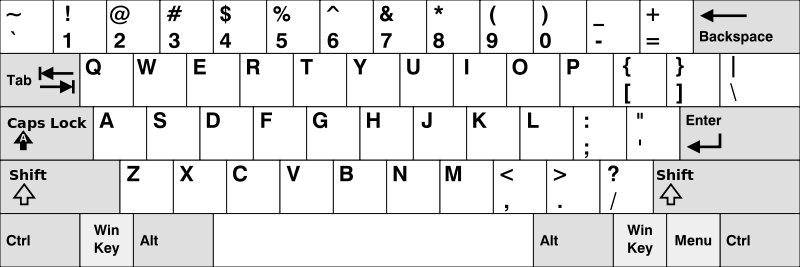
Given an array of strings words, return the words that can be typed using letters of the alphabet on only one row of American keyboard like the image below.
In the American keyboard :
- the first row consists of the characters
"qwertyuiop", - the second row consists of the characters
"asdfghjkl", and - the third row consists of the characters
"zxcvbnm".
Example 1:
Input: words = ["Hello","Alaska","Dad","Peace"]
Output: ["Alaska","Dad"]
Example 2:
Input: words = ["omk"]
Output: []
Example 3:
Input: words = ["adsdf","sfd"]
Output: ["adsdf","sfd"]
Constraints:
1 <= words.length <= 201 <= words[i].length <= 100words[i]consists of English letters (both lowercase and uppercase).
题目大意
给你一个字符串数组 words ,只返回可以使用在 美式键盘 同一行的字母打印出来的单词。键盘如下图所示。
美式键盘 中:
- 第一行由字符
"qwertyuiop"组成。 - 第二行由字符
"asdfghjkl"组成。 - 第三行由字符
"zxcvbnm"组成。

示例 1:
输入: words = ["Hello","Alaska","Dad","Peace"]
输出:["Alaska","Dad"]
示例 2:
输入: words = ["omk"]
输出:[]
示例 3:
输入: words = ["adsdf","sfd"]
输出:["adsdf","sfd"]
提示:
1 <= words.length <= 201 <= words[i].length <= 100words[i]由英文字母(小写和大写字母)组成
解题思路
创建键盘行映射:
- 使用一个数组
rowMap映射每个字母到其所在的键盘行。 - 例如,
rowMap[0]表示字母a,rowMap[25]表示字母z。
- 使用一个数组
定义辅助函数:
getRow(char):返回字母char所在的键盘行,注意处理大小写。isSameRow(word):判断单词word是否所有字母都在同一行。
过滤单词:
- 遍历单词数组
words,利用filter方法,使用isSameRow判断其是否符合条件,仅保留满足条件的单词。
- 遍历单词数组
返回结果:
- 返回经过过滤后的单词数组。
复杂度分析
- 时间复杂度:
O(n × m),假设单词平均长度为m,总共有n个单词,需要遍历每个单词中的每个字母。 - 空间复杂度:
O(1),使用了一个常量数组row和一些临时变量。
代码
/**
 * @param {string[]} words
 * @return {string[]}
 */
var findWords = function (words) {
	// 键盘行映射
	const getRow = (char) => {
		const rowMap = [
			2, 3, 3, 2, 1, 2, 2, 2, 1, 2, 2, 2, 3, 3, 1, 1, 1, 1, 2, 1, 1, 3, 1, 3, 1,
			3
		];
		const idx = char.toLowerCase().charCodeAt() - 'a'.charCodeAt();
		return rowMap[idx];
	};

	// 判断单词是否在同一行
	const isSameRow = (word) => {
		const row = getRow(word[0]);
		for (let char of word) {
			if (row !== getRow(char)) return false;
		}
		return true;
	};

	// 筛选符合条件的单词
	return words.filter((word) => isSameRow(word));
};
相关题目
| 题号 | 标题 | 题解 | 标签 | 难度 | 力扣 |
|---|---|---|---|---|---|
| 3324 | 出现在屏幕上的字符串序列 | 字符串 模拟 | 🟠 | 🀄️ 🔗 | |
| 3330 | 找到初始输入字符串 I | 🟢 | 🀄️ 🔗 | ||
| 3333 | 找到初始输入字符串 II | 🔴 | 🀄️ 🔗 |